



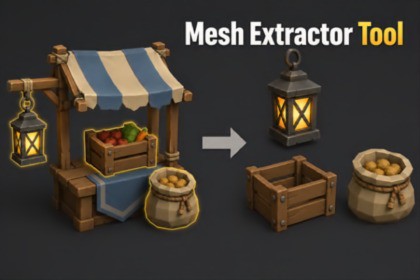
RVFX Mesh Extractor – Face Selection & Mesh Separation
RVFX
$15.00
$30.00
50%OFF
(no ratings)
Jump AssetStore
Select areas on MeshRenderer or SkinnedMeshRenderer objects, extract or split clean assets, crop matching texture regions, preserve materials, and export ready-to-use mesh parts inside Unity.Mesh Extractor Tool is a fast and simple Unity editor tool for extracting, splitting, and exporting selected areas from existing 3D meshes.Select mesh faces directly in the Scene View, separate the selected area into a new asset, or split it from the original model without leaving Unity.Designed for asset cleanup, prop separation, kitbashing, modular asset creation, and quick mesh editing workflows.◆ Material-Aware ExtractionMesh Extractor Tool is built to preserve useful material data during extraction.It supports shared materials, multiple material slots, submesh-based material assignments, and texture crop workflows.When texture cropping is enabled, the tool can create matching cropped texture assets and generated materials for the extracted mesh part.This helps separated parts stay clean, organized, and ready to reuse without manually rebuilding material references.◆ Renderer SupportSupports both MeshRenderer and SkinnedMeshRenderer objects.This makes it useful for regular props, environment models, characters, equipment, accessories, and other imported 3D assets.◆ What You Can Do• Select mesh faces directly in the Unity Scene View• Extract selected mesh areas into separate assets• Split selected parts from the original mesh• Preserve source materials and material assignments• Work with shared materials• Handle meshes with multiple materials and submeshes• Crop matching texture regions for extracted parts• Generate matching cropped textures and materials• Export extracted mesh parts for reuse◆ Common Use CasesUse this tool to separate props from combined meshes, extract parts from imported 3D models, split environment objects into modular pieces, isolate character accessories, prepare reusable mesh parts, or clean up assets directly inside Unity.It is especially useful for:• Prop separation• Environment asset cleanup• Modular kit creation• Kitbashing workflows• Character accessories and equipment• Imported model cleanup• Preparing mesh parts for further editing◆ Suitable ForMesh Extractor Tool works well with common Asset Store models, custom imported meshes, modular kits, props, characters, accessories, equipment, and production assets.Suitable for many genres and styles, including fantasy, medieval, sci-fi, stylized, low-poly, realistic, RPG, action, survival, and environment-heavy games.◆ NotesFBX export may require Unity’s FBX Exporter package depending on your export settings.Results can vary depending on the structure of the source mesh, UV layout, material setup, shader setup, and texture usage.Texture cropping works best when the source mesh has usable UVs and clearly assigned texture regions.Technical detailsKey FeaturesUnity Editor tool for mesh extraction, mesh splitting, and mesh part exportScene View face selection workflowSupports MeshRenderer objectsSupports SkinnedMeshRenderer objectsExtract selected mesh areas into separate mesh assetsSplit selected mesh parts from the original modelPreserve source materials and material assignmentsSupports submesh-based extraction workflowsCrop matching texture regions for extracted mesh partsExport extracted parts as reusable mesh assetsOptional FBX export workflow with Unity FBX Exporter packageUseful for asset cleanup, prop separation, kitbashing, modular asset creation, and mesh editingDesigned for artists, technical artists, level designers, and developersSupported WorkflowsExtract selected faces into a new objectSplit selected faces from the original meshSeparate props from combined meshesCreate modular mesh parts from imported modelsExtract accessories, equipment, environment pieces, or character partsPreserve overlapping UV layouts where applicableKeep material-based workflows clean and reusableCompatibilityWorks inside the Unity EditorSupports standard imported mesh assetsSupports MeshRenderer and SkinnedMeshRenderer based objectsFBX export may require Unity’s official FBX Exporter packageResults depend on the source mesh structure, UV layout, material setup, and texture configurationPackage IncludesMesh Extractor editor windowScene View selection toolsExtraction and split workflowMaterial and texture handling toolsExport utilitiesDocumentation / quick start guide

