



Easy Design - Editor Level Design Tool
Birich Studio
$13.99
$19.99
30%OFF
(no ratings)
Jump AssetStore
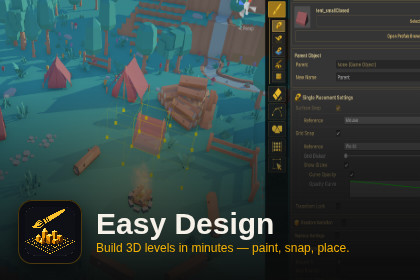
A visual 3D level design tool for Unity Editor. Place, snap, erase, path, shape, and array prefabs directly in the SceneView.Tired of dragging prefabs one-by-one into your scene? Easy Design turns Unity's Scene view into a full level design suite — brush, array, path, shape, wall, manipulate, and more — all from a single unified tool. Stop fighting the editor and start designing. Key features at a glance5 placement modes + grid snapping + object-surface grids + slope-aware surface snapPath, shape, and array distribution with multi-prefab weighted pools and deterministic seedsWall mode — modular anchor-chain placement with corner alignment and Lap JointBrush / marquee / click selection with advanced filtersUnified Transform Layer (G/R/S) for quick move, rotate, scale in every modeNon-destructive scene manipulation (extend, mirror, randomize)Instant prefab creation and cached copy workflowReplace any object with another in a single click — with hover preview What's insidePlacement modesFive placement strategies — Single, Serial, Bulk, Brush, and Wall — cover every scenario from precise one-off placement to modular anchor-chain building. Snap to world space with Grid mode, or use Object Reference Grid mode to divide any object's surface into a grid and place props directly on top of it. Surface Snap now supports an Object Reference mode with Align to Slope, so prefabs sit correctly on ramps, stairs, and uneven terrain. The built-in Replace feature lets you swap one object for another with a hover preview and Reference Point alignment (Bottom / Center / Top). Optional Auto Mesh Collider drops a convex collider on placed prefabs that lack one.Placement controls — while placing, press G for free movement, R for free rotation, S for free scaling, Q/E for snapped rotation. Single-press for fine control with Unity's gizmo + keyboard nudge, double-press for mouse-follow Free mode. Lock to X/Y/Z axes, switch between Group and Individual pivot — everything happens right in the Scene view, no inspector roundtrips. Wall modeModular anchor-chain placement for walls, fences, and stacked boxes. Place a seed prefab and slot wireframes appear on its free faces; click a slot to chain forward. Smart corner alignment, Lap Joint corner overlap, Overlap Check, session memory (double-click any past wall to make it the new anchor), and Ctrl+Z anchor rewind. Path modeDistribute objects along a custom path — perfect for fences, road props, tree lines, or anything that needs to follow a curve. Multiple prefabs with weighted pools and deterministic seeds, plus Object Snap (Ground) so each item rides uneven terrain individually. Shape modeArrange objects into a chosen shape, and optionally fill the interior. Great for circular arrangements, rectangular formations, and structured set dressing. Surface Reference modes (Mouse / ShapeObject) make ring and frame layouts wrap around objects on uneven terrain.Array modePopulate a selected area with objects arranged in a clean, ordered layout — ideal for repeating elements across large spaces. Multi-prefab weighted pools with deterministic seeds, and an optional Ground Target restricts the array to a chosen scene object's footprint.Eraser modeSingle and Brush variants, combined with a rich filter system, let you isolate and delete exactly the objects you want — no more accidentally nuking the wrong prop. Selection modeClick, Marquee, and Brush selection, all powered by the same advanced filters. Pick out exactly the set you need, then act on it with Q/E/R/S/G transform shortcuts, axis lock, and Group/Individual pivot mode.Manipulate modeWork with objects already in your scene:Extend — extend selected objects in any direction, as far as neededMirror — generate a mirrored version of your selectionRandom — assign randomized values within user-defined ranges to transform propertiesCreate Prefab — convert selected scene objects into prefabs instantlyCached Copy — treat any scene object as a placeable unit in Placement mode, no prefab conversion requiredPrefab BrowserFolder navigation with async thumbnails, debounced search, and native .fbx / .obj model support — drop models in as Model Prefab Instances or Convert to Prefab right-click.CompatibilityBuilt and actively developed on Unity 6.x, with verified compatibility on Unity 2022 LTS. Every mode has been tested across both versions. Support & feedbackYour feedback drives this tool. Bug Report and Contact buttons are built right into the tool header (and Tools > Easy Design > Help), so reporting an issue takes one click. Bugs get fixed fast, and feature requests shape the roadmap. Nothing matters more to us than the comfort and productivity of the people using Easy Design every day.8 Interaction Modes: Placement, Erase, Manipulate, Path, Shape, Array, Selection, Idle — each with its own SceneView overlay controls. Plus a unified Transform Layer (G/R/S) that works on top of every mode.5 Placement Sub-Modes: Single (click-to-place), Serial (drag across cells), Bulk (rectangular area fill with 3D Y-layer scroll), Brush (freehand painting with weighted multi-prefab list, density, spacing, overlap check, and Advanced Surface Filters by Tag / Layer / regex), Wall (modular anchor-chain placement with Smart corner alignment, Lap Joint, Overlap Check, session memory, and Ctrl+Z anchor rewind).Real-Time Ghost Preview: See exact position, rotation, and scale before placing. Ghost uses HideFlags and Ignore Raycast layer — never pollutes your scene.Transform Layer (G/R/S): Single-press for fine control with Unity's gizmo + keyboard nudge (Q/E, scroll, arrow keys, PageUp/Down). Double-press within 300 ms for mouse-follow Free mode. Axis lock (X/Y/Z + C cycle), Group/Individual pivot, Pivot/Top/Center/Bottom reference point, action chaining. Includes its own dockable SceneView overlay.Smart Grid Snap: Automatic grid unit calculation from prefab bounds. Dynamically recalculates on rotation and scale changes. Grid Scale Divisor (1–10×) via Shift+Scroll for finer control.Surface Snap: Physics.Raycast-based snapping to real geometry with cardinal normal alignment. Supports top and side faces. Falls back to ground plane when no surface is hit. Object Reference mode samples an N×N (3–9) downward grid under the prefab footprint instead of the cursor; Align to Slope runs least-squares plane regression with rigid-body rest so prefabs sit correctly on ramps and stairs.Object-Reference Grid: Snap relative to a target object's local coordinate system — precise alignment on rotated or tilted surfaces.Replace Mode: Swap any object for another in Single, Serial, or Bulk. Optional Apply Position / Rotation / Scale, Reference Point alignment (Default / Bottom / Center / Top), Bulk Same Object Only filter, and a Single hover preview that renders the ghost on the target's transform.Auto Mesh Collider: Optional convex MeshCollider auto-added to placed prefabs that have a renderer but no collider. Covers every placement flow including Selection Replace.Spline Path System: Catmull-Rom spline with click-to-add knots, Shift-constrained placement (creation and editing), and interactive knot editing. Distribution by spacing or count. Four rotation modes: Follow Tangent, Linear, Fixed, Random. Start/end offset, uniform and random scale, position offset, and closed-loop option. Multi-prefab weighted pools with WeightedRandom or Sequential pick mode, deterministic seed UI, and Object Snap (Ground) so each item rides uneven terrain individually.Shape Placement: Polygon (3–12 vertices) and circle formations. Two-click workflow: set center, then radius. Fit Mode auto-calculates radius for gap-free edge placement. Align-to-Edge rotation, extra spacing, and scroll-to-rotate during placement. Surface Reference modes (Mouse / ShapeObject) make ring and frame layouts wrap around objects on uneven terrain.Array System: Column × Row × Layer grids with drag-to-create. Live editing of spacing, rotation, offset, and expand mode. Multi-prefab weighted pools with deterministic seed UI. Optional Ground Target restricts active cells to a chosen scene object's footprint. Seeded random variation (rotation, scale, offset per item). Dissolve to unparent all children. Safety dialog for high cell counts.Selection Mode: Click, Marquee (screen-space rectangle), and Brush (3D sphere) selection. Advanced filter by prefab type, tag, layer, and name regex (include/exclude). AND/OR combine mode. Select All with active filters. Q/E/R/S/G transform shortcuts on the selection with axis lock and Group/Individual pivot mode. Replace section with the same Auto Mesh Collider toggle as Placement.Manipulation Tools: Extend (clone in 5 directions with drag-to-extend), Mirror (reflect across planes), Random (individual or group transforms), Create Prefab from selection (saved at world origin with bottom-center pivot), Cached Copy for repeated stamping. Mirror/Extend preserve extra in-scene components (Rigidbody, custom scripts).Erase Mode: Single-pick with hover highlight or brush-area deletion. Scroll to resize brush. Optional prefab type filter. Tag, layer, and name regex (include/exclude) filters. Camera and light protection toggles.Random Variation: Per-axis random rotation, scale, and position offset applied at placement time. Independent min/max ranges per axis.Configurable Reference Point: Pivot or custom 3×3 anchor grid × 3 height layers (27 positions total) for precise placement offset control. Reference point stays fixed during rotation and scale.Prefab Browser: Dedicated window with folder navigation, thumbnail grid, debounced toolbar search (recursive, allocation-free name match, 500-result cap), right-click context menu (Select, Replace Selected, Add/Remove from Brush/Path/Array list, Convert to Prefab). Native .fbx / .obj model support — drop in as Model Prefab Instances or convert to a real prefab on demand. Shift+Click routes thumbnails into the active tool's prefab pool.SceneView Overlay Toolbar: UIElements-based compact toolbar. Auto-shows when the tool is active. Mode buttons with inline sub-mode rows. Icon-based with tooltips. Separate dockable Transform Layer overlay shows live Axis · Pivot · Step status with quick edit foldout.Full Undo: Complete Unity Undo integration for all operations. Multi-object actions collapsed into single undo groups.Right-Click Context Menu: Select any scene object's source prefab in Easy Design directly from the Hierarchy or SceneView — optionally with its current transform.In-Tool Help & Support: Bug Report and Contact buttons built into the tool header (and Tools > Easy Design > Help); both pre-fill Unity / tool / OS info.ScriptableObject Settings: All configuration stored in a ScriptableObject asset. Duplicate to create reusable presets. Full custom Inspector with safety validation and 272 English [Tooltip] attributes for every serializable field. Over 40 advanced parameters including raycast distance, input sensitivity, visual tweaks, and safety limits. Reset to Defaults included.Parent Object System: Assign any transform as the placement parent. All placed objects are automatically parented with undo support.Map Boundary: Configurable width, height, and ground Y. Visual wireframe outline with corner height markers. XZ position clamping enforced during placement.Safety Features: Play Mode protection (auto-deactivates). Domain reload cleanup (no orphan ghosts). Configurable warning thresholds for large operations. All settings safety-clamped with OnValidate.RequirementsTested on: - Unity 6000.x (primary development version) - Unity 2022.3 LTS (compatibility pass — basic testing) Note: Full feature testing was performed on Unity 6. Unity 2022.3 compatibility has been verified for core functionality. If you encounter any issues on 2022.3, please contact. Universal Render Pipeline (URP) compatible Editor extension only — no runtime overhead or dependencies UI Toolkit (UIElements) based interfaceBuilt with AI-assisted coding and manually refined AI-generated icons.

