



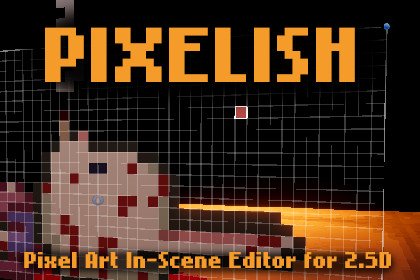
PIXELISH - Pixel Art In-Scene Editor for 2.5D Games
Nighty Knight Studio
$9.99
(no ratings)
Jump AssetStore
A powerful Unity editor tool for editing pixel art sprites directly in the 3D Scene view with real-time visual feedback, created for 2.5D game making.The Problem That Started It AllWhile developing my 2.5D game, I constantly faced a frustrating workflow issue: I needed multiple sprites to animate in sync with each other, positioned throughout a 3D environment. But every time I opened my pixel art editor, I lost all spatial context. I couldn't see how sprites related to each other in 3D space, leading to constant back-and-forth between my pixel art software and Unity.So I built a solution.Edit Pixel Art Without Leaving UnityPixel Art Scene Editor lets you paint and edit sprites directly in the Scene view, with full 3D spatial awareness. See your sprites exactly as they'll appear in-game, maintain perfect alignment with neighboring sprites, and iterate rapidly without ever leaving Unity.The workflow is simple:Select a sprite in your sceneActivate the tool and start paintingSee changes in real-time, in full 3D contextSave your edited sprite (original stays safe)Optionally add it as a Timeline keyframeMove to the next sprite and repeatCore Painting ToolsBrush Tool (1) - Paint pixels with adjustable brush size (1-5 pixels)Eraser Tool (2) - Remove pixels with transparencyColor Picker Tool (3) - Sample colors directly from your spriteFill Tool (4) - Flood fill with intelligent queue-based algorithmKeyboard shortcuts (1-4 keys) let you switch tools instantly while painting.Symmetry PaintingHorizontal Mirror - Paint once, mirror across vertical axisVertical Mirror - Paint once, mirror across horizontal axisBoth Axes - 4-way symmetryPixel Grid OverlaySemi-transparent grid for pixel-perfect precisionToggle on/offCanvas ExpansionAdd pixels to any edge (left, right, top, bottom)Pivot automatically adjusts - sprite stays in exact world positionPreview new size before applyingFor adding borders or extending sprites without breaking scene referencesGPL Palette SupportLoad GIMP Palette (.gpl) filesReal-Time 3D PreviewSee exactly how your sprite looks in the sceneNo more guessing how edits will look in-gameTimeline IntegrationOne-Click Sprite Animation KeyframesOpen Timeline with your sprite's GameObjectPaint your sprite in the Scene viewClick "Save to Asset and Add Timeline Key"A keyframe is automatically created at the playhead positionTimeline integration featuresCreates Animation Clips automatically if neededUpdates existing keyframes instead of duplicatingOnly enables when Timeline window is openValidates track bindings before attempting to add keysConvenient File ManagementNon-Destructive EditingOriginals always protected - Never modifies source spritesCreates edited copies with configurable namingAuto-suggests save location based on original spriteOptional custom suffix (default: "_edited")Auto-Increment FilenamesAutomatically appends _01, _02, _03... to new savesFinds next available number automaticallyExact Pivot PreservationUses Unity's ISpriteEditorDataProvider APIMaintains pixel-perfect pivot positioningYour sprite stays exactly where it should in the sceneNo manual pivot adjustments needed after savingProper Import SettingsPoint filtering (pixel-perfect rendering)Uncompressed format (maximum quality)sRGB color space (correct colors)Matches original sprite's pixels-per-unitEverything configured automaticallyFull Undo/Redo SupportPer-stroke undo - Each paint action undos individuallyIntegrated with Unity's undo system (Ctrl+Z / Cmd+Z)Works across all tools (paint, erase, fill, canvas expansion)Undo history preserved throughout editing sessionWorkflow FeaturesTimeline Override ProtectionDetects when Timeline tries to change your spriteShows clear warning in Scene viewAutomatically restores your editable spritePrevents accidental overwriting of your workHow to use:Open: Window > Pixel Art Scene EditorClick: "Activate Tool"Select: Any sprite in your scenePaint: Use tools or keyboard shortcuts (1-4)Documentation & SupportQuick Start GuideVideo GuideRoadmapPlanned Features:Opacity slider for semi-transparent paintingLine toolSpray paint tool with randomizationAdditional keyboard shortcut customizationFuture Release:Layer support for complex compositionsLayer blending modesLayer visibility controlsAseprite file format import/exportOnion Skin⚠️ PLEASE NOTICE - a few technical remarks :This tool was designed for editing sprites within a 3D enviroment to make the development of 2.5D games easier. I have not tested its use in a 2D project.Tool was only tested editing sprites in a 3D enviroment.Unity's 2D Sprite package needs to be installed from the Package Manager in order to use the tool. It is not installed by default when you create a 3D project. You can also install the entire 2D list of packages.I have worked hard to eliminate all bugs. If you do come across one, please contact me with details so it can be fixed!If you have any suggestions or requests for future versions, please don't hesitate to contact me!Built By a Solo Developer, For Fellow DevelopersThis tool was born from real needs I faced while developing my game. I created it to streamline my own workflow and quickly realized it could help many others facing the same challenges.If you genuinely need this tool but can't afford it, please contact me directly—we'll work something out. But if purchasing is within your means, your support directly funds continued development of this tool and helps me dedicate more time to creating useful resources for the community (as well developing my own game).Thank you for considering it! 🙏AI was used as an aid in the creation of this tool.

