



Procedural UI – Sprite-Free UI Shapes & Gradients
Cross Canva
$15.99
$19.99
20%OFF
Jump AssetStore
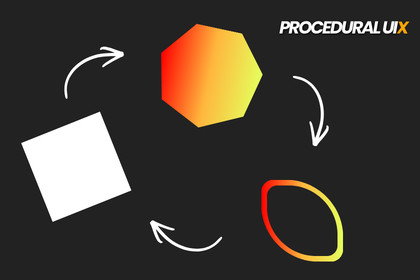
Procedural UI lets you easily create modern UI shapes with rounded corners, borders, and gradients — all without using a single sprite.Procedural UIX (Sprite-Free UI Image)Procedural UI is a lightweight, flexible UI solution for creating fully procedural, resolution-independent shapes directly inside Unity’s UI system.Design modern UI elements without relying on sprite atlases, while keeping sharp visuals, smooth edges, and excellent performance across all platforms.Whether you’re building buttons, panels, icons, or decorative UI elements, Procedural UI gives you precise control over shape appearance, borders, gradients, and effects — all in real time.Key Features:Shape Rendering10 Procedural Shape Modes: Circle, Triangle, Rectangle, Pentagon, Hexagon, Heptagon, Octagon, Decagon, Dodecagon, and HeartIndependent corner radius control (square radius is adjustable separately)Fill, Stroke, and Outline rendering with arbitrary thicknessPerfect anti-aliased edges with no extra performance costStyling & EffectsAdjustable border widthEdge falloff for smooth anti-aliasing, soft shadows, or glow effectsFall-off control for subtle UI depth and polishMasking support for complex UI compositionsColors & GradientsSolid color supportGradient modes: Linear, Radial, CornerOverlay sprites or textures on top of procedural shapesCombine gradients and overlays for rich UI visualsFill ModesHorizontalVerticalRadialRequirementsUnity 2021.3 LTS or newer (recommended)Works with:Built-in Render PipelineUniversal Render Pipeline (URP)High Definition Render Pipeline (HDRP)🚀 Why Procedural UI?No sprite dependencyFully scalable and resolution independentIdeal for modern, dynamic UI designClean visuals with minimal setupWorks seamlessly across all Unity render pipelinesProcedural UIX is perfect for developers who want flexible, high-quality UI elements without the overhead of managing multiple sprites or textures.Have a question, feature request, or found an edge case? Reach out at crosscanvas.contact@gmail.com — we read and respond to every message, and reviews help us keep improving the asset for everyone.Fully procedural UI shape rendering (no sprites required)10 shape modes: Circle, Triangle, Rectangle, Pentagon, Hexagon, Heptagon, Octagon, Decagon, Dodecagon, HeartAdjustable fill, stroke, and outline with arbitrary thicknessIndependent corner radius control (including square radius)Adjustable border width and edge falloffSoft shadow / glow effect using falloffPerfect anti-aliased edges with zero extra performance costFill modes: Horizontal, Vertical, RadialSolid colors and gradient support (Linear, Radial, Corner)Sprite/texture overlay support on procedural shapesUI masking supportResolution-independent renderingCompatible with Built-in, URP, and HDRP render pipelinesAI tools were used to assist with performance optimization ideas, script structure, and code readability. All scripts, editor tools, logic flow, and final implementations were thoroughly reviewed, tested, and manually integrated by me inside Unity.

