






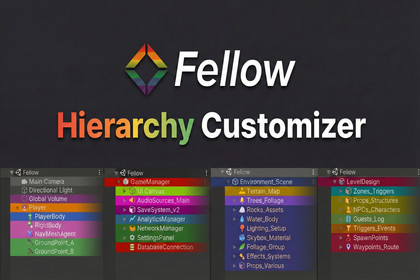
Customize Unity’s Hierarchy with colors, icons, gradients, and bold labels via a quick middle-click popup. Editor-only, instant apply, no runtime impact.Essential hierarchy organization toolFellow Hierarchy lets you visually organize Unity’s Hierarchy window by customizing GameObjects with colors, gradients, icons, and text styles. It is designed to make complex scenes easier to read, faster to navigate, and more enjoyable to work with.All customizations are applied instantly via a middle mouse click popup directly on Hierarchy items, with no extra windows and no save steps.Designed to beMinimal – Focused purely on Hierarchy visualizationFast – Instant apply, no confirmation or save buttonsIntuitive – Right where you work: inside the HierarchyCustomizable – Fully user-defined colors, icons, and presetsEditor-only – Safe to use with zero runtime impactHierarchy Customization FeaturesApply background colors to GameObjectsOptional gradient / fade effect with adjustable strengthCustomize text color and alignmentBold labels for important objectsAssign built-in or custom iconsApply styles to child objects in one clickPreset SystemBuilt-in color and icon presetsFully editable via ScriptableObject databaseAdd, remove, and customize presets easilyReusable styles across different scenesClean & Efficient WorkflowWorks directly inside Unity’s Hierarchy windowMiddle mouse click to open the customization popupNo save button – changes apply instantlyEnable / disable the system from the menuClear all customizations with a single actionUniversal Project SupportCompatible with Built-in Render PipelineFully compatible with URPFully compatible with HDRPSuitable for any Unity project, any genre, any scaleSafe & LightweightEditor-only functionalityNo runtime overheadDoes not modify GameObject dataNo impact on build size or performanceExtends Unity’s Hierarchy window using editor callbacksMiddle mouse click popup for per-GameObject customizationSupports background colors, text colors, gradients, and bold labelsAssign built-in Unity icons or custom Texture2D iconsAdjustable gradient (fade) strength with live previewOne-click apply to child GameObjectsPreset system for colors and icons (ScriptableObject-based)Fully editable presets via custom inspectorEnable / disable system from Unity menuClear all hierarchy customizations with a single actionEditor-only implementation with zero runtime overheadDoes not affect play mode, builds, or performanceAI was used only for creating promotional visuals and marketing images for the asset. No AI was used in the code, logic, or functionality of the package.

