



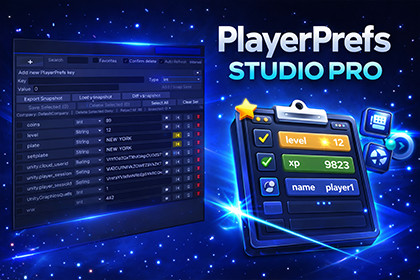
Professional Unity editor tool for viewing, editing and debugging PlayerPrefs with snapshot, diff, favorites, batch operations and fast inline editing workflow.This tool is an Editor-only utility and does not rely on any rendering pipeline.Compatible with:• Built-in Render Pipeline• URP (Universal Render Pipeline)• HDRP (High Definition Render Pipeline)No shaders, materials, or graphics features are used.Works in any Unity project regardless of render pipeline configuration.MAG PlayerPrefs Studio is a professional Unity Editor tool designed to make working with PlayerPrefs faster, cleaner and safer during development.It allows developers to instantly view, edit, create and delete PlayerPrefs keys directly from the Unity Editor, without writing debug scripts or switching between play mode and code.Built for productivity and debugging speed, this tool provides a compact, modern interface where all PlayerPrefs values can be managed in seconds.🚀 Core Features• Inline editing for Int, Float and String values• Create new PlayerPrefs keys using the large quick-add button• Delete keys with confirmation to prevent mistakes• Undo / Discard changes for modified values• Favorites system to pin frequently used keys• Prefix grouping for better organization• Batch save and batch delete operations• Auto-refresh while working in editor• Manual refresh option📊 Snapshot & Diff SystemA powerful debugging feature for development and testing:• Export PlayerPrefs snapshots to JSON• Load snapshots from file• Compare current values vs snapshot• Detect added / removed / changed keys• Restore values from snapshot instantly• Overwrite all PlayerPrefs from snapshot when neededPerfect for QA workflows, balancing tests, and restoring development states.🎯 Workflow AdvantagesMAG PlayerPrefs Studio removes the need to:• Write temporary debug scripts• Open registry or local files manually• Guess PlayerPrefs values during playtesting• Restart play mode for small changesEverything can be handled directly inside the editor.💡 Designed For• Game developers• Tool developers• QA & testing workflows• Mobile game tuning• Rapid prototyping• Save system debuggingWorks with any Unity project using PlayerPrefs.🔧 IntegrationNo setup required.Install → Open window → Start editing PlayerPrefs.Unity Menu:Tools → MAG Software → PlayerPrefs Studio🧠 Built for ProductivityThe tool focuses on speed and clarity:• compact single-line layout• minimal clicks• instant feedback• safe editing workflowDesigned to fit naturally into daily development work.🌐 Explore More ToolsCheck other MAG Software tools: https://assetstore.unity.com/publishers/68634Version: 1.0Unity compatibility: 2021.3+Platforms: Editor (Windows, macOS, Linux)Render pipelines: Built-in, URP, HDRP compatibleDependencies: NoneSetup required: NoSource included: YesFeatures included:• PlayerPrefs viewer• Inline value editing• Key creation system• Delete & confirmation system• Undo changes per key• Favorites & filtering• Prefix grouping• Batch operations• Snapshot export/import• Diff comparison system• Restore from snapshot• Editor auto-refreshAI was used strictly for visual content creation and presentation assets.

