






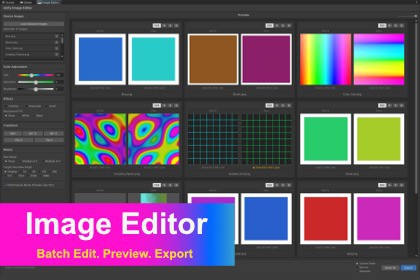
Image Editor - Batch Edit, Preview, Export
eztoolslab
$4.99
$9.99
50%OFF
(no ratings)
Jump AssetStore
A batch image editing tool integrated into the Unity Editor, supporting color adjustments, transforms, channel inspection, and smart exportImage Editor by EzToolsLab is the fastest way to batch-process textures without leaving Unity. Select your images, tweak colors, resize, and export — all with instant visual feedback.3 core :Color & Effects — HSB fine-tuning (with Colorize mode), grayscale conversion (BT.601), RGB inversion, and transparent area fill (black/white background).Transforms & Sizing — Rotation (90°/180°, cumulative), flipping, resize (32–4096 with aspect ratio preservation and bilinear interpolation), and size rounding to multiples of 2 or 4.Performance & Workflow — All processing in a single GPU draw call (uber shader), large image preview capped at 512px (Performance Mode), export preserves original TextureImporter settings.Who Is This For?- Game developers who need to batch-resize or color-correct texture assets- Technical artists adjusting Normal Maps, alpha channels, or texture formats- UI/UX designers processing icon sets and interface graphics- Anyone who wants a built-in image editor without switching to PhotoshopKey Features- Load and edit multiple images simultaneously with a visual Before/After preview grid and adjustable card width- Fine-tune Hue (-180 to +180), Saturation (-100 to +100), and Brightness (-100 to +100) with colorful gradient sliders and per-degree arrow key control- Apply uniform color tint using Colorize mode with target HSV values- Convert to Grayscale (BT.601 luminance weighting) with a single toggle- Invert RGB channels while preserving alpha transparency- Fill transparent areas with White or Black background- Rotate images (90 CW, 90 CCW, 180) with cumulative rotation support- Flip Horizontal or Vertical with one click- Resize to target sizes from 32 to 4096 with aspect ratio preservation and bilinear interpolation- Round sizes to Multiple of 2 or Multiple of 4 for platform-optimal dimensions- Preview capped at 512px in Performance Mode for responsive editing of large textures; export at full resolution- Process all transforms, color adjustments, and effects in a single GPU draw call via uber shader- Inspect R, G, B, A channels individually with per-image channel mode memory- Auto-detect Normal Maps via TextureImporter and display correctly (DXT5nm/BC5 formats)- Export to Custom Folder, Save As dialog, or Overwrite original files directly- Preserve source TextureImporter settings (npotScale, sRGB, filterMode) on export- Access instantly via right-click textures > EzToolsLab > Image Editor- Configure defaults via Edit > Project Settings > EzToolsLab > Image Editor- Includes demo scene with billboard layout showcasing all example texturesTechnical Specifications- Unity Version: 2022.3 LTS or later- Platforms: Editor only (Windows / macOS / Linux)- Render Pipeline: All (Built-in, URP, HDRP)AI tools assisted in the creation of code and images, which were subsequently refined manually.

