






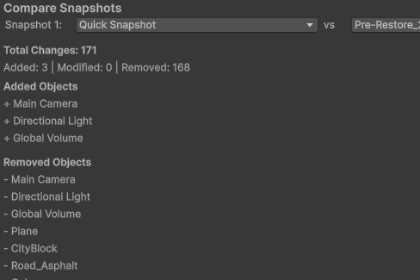
SceneGit brings Git-like snapshots, visual diffs, and semantic three-way merges to Unity, letting teams capture, compare, restore, and safely merge scene edits inside the editor.Unlike traditional version control systems that work at the file level, SceneGit works at the GameObject and Component level, giving you granular control over scene state management. Whether you're experimenting with level design, iterating on gameplay, collaborating on shared scenes with teammates, or need a safety net before major changes, SceneGit has you covered.What Makes SceneGit Different?• Works entirely within Unity — no external tools required • Real-time change tracking with visual Hierarchy indicators (● MOD / ● NEW) • Three-way Semantic Merge for combining concurrent team scene edits • GitHub Actions CI pipeline and team readiness validator included • Comprehensive restore logging with full Unity Undo support • Supports all GameObject types including prefabs, UI, particles, and physics • Non-destructive workflow with automatic safety snapshots • Export / Import snapshots across projects and team membersTeam Scene Merging (New in 2.0)SceneGit now includes a dedicated Semantic Merge window:Agree on a shared Base snapshot before two people start editing.Person A works normally and keeps their scene as Mine.Person B shares an incoming snapshot as Theirs through Git or Export/Import.Open Tools → SceneGit → Semantic Merge, select the three snapshots, then click Analyze Merge.Non-overlapping additions (e.g., one teammate adds a car, another adds a van) coexist automatically.Conflicts are clearly reported when both sides change the same object, or one side deletes what the other modified.Save the merged snapshot or apply it directly to the current scene.GitHub Team Integration (New in 2.0)SceneGit ships with ready-to-use GitHub repository files for multi-person Unity projects:• GitHub Actions workflow for pull request hygiene checks (text serialization, .meta coverage, conflict markers, snapshot JSON validity) • CI script that flags scene changes lacking a related SceneGit snapshot • Pull request template, CODEOWNERS starter, and contribution guide • In-editor Team Readiness Check (Tools → SceneGit → GitHub → Run Team Readiness Check) validates your local Git setup, Smart Merge config, LFS availability, SceneGit identifiers, and active-scene snapshots before you open a PRKey FeaturesSnapshots • Create, name, describe, and tag instant scene snapshots • Quick Snapshot from the Scene View overlay or menu — one click, no prompts • Full restore, transform-only restore, or selective object restore • Smart-diffing restore algorithm — surgically modifies the scene instead of recreating it • Every restore is registered with Unity's native Undo systemVisual Comparison • Side-by-side Diff Viewer shows Added (green), Removed (red), and Modified (yellow) objects • Transform Gizmos render ghostly lines in the Scene View showing exactly where objects moved • Live Hierarchy Indicators track uncommitted changes in real-timeSemantic Merge • Three-way merge (Base / Mine / Theirs) at the GameObject level • Persistent SceneGit GUIDs survive renames, hierarchy moves, and duplication • Non-overlapping additions merge automatically; conflicts are clearly reported • Configurable conflict resolution (keep Mine or use Theirs)Automation & Workflows • Auto-snapshot at configurable intervals • Optional safety snapshot on scene save (Ctrl+S) • Automatic cleanup of stale auto-snapshots • Export / Import snapshot archives across projectsGitHub CI Pipeline • GitHub Actions checks for Force Text serialization, .meta hygiene, conflict markers, and snapshot validity • Scene-change-without-snapshot detection • In-editor Team Readiness Check with exportable reportHow Snapshots WorkSceneGit uses a lightweight JSON-based storage system: • Each GameObject gets a persistent GUID via a hidden SceneGitIdentifier MonoBehaviour • Component data is serialized using Unity's JsonUtility • Hierarchy relationships are preserved via GUID references • Prefab connections are tracked via asset paths • Scenes are mapped by Unity Asset Database GUID — immune to file renamesStorage LocationSnapshots stored at: Assets/Editor/SceneGit/Storage/Snapshots/ Settings stored in: ProjectSettings/SceneGitSettings.asset (project-bound, version-controllable)Performance Characteristics• Snapshot Creation: ~100 ms for a typical scene (500 objects), ~1 s for a large scene (5 000+ objects) • Restore: Similar to creation time; depends on scene complexity • Change Tracking: Minimal overhead, updates every 0.5 s in Edit mode • Storage: ~5–50 KB per snapshot depending on scene sizeCompatibility• Unity Versions: 2020.3 LTS and newer (including Unity 6) • Render Pipelines: Built-in, URP, HDRP • Platforms: Windows, macOS, Linux • Special Components: UI, Particles, Physics, Animation, and moreAI Assistance in Development AI was utilized during the development of SceneGit primarily for deep codebase auditing, architectural refactoring, and automated quality assurance. This included identifying and patching Editor memory leaks, migrating global serialization systems to project-bound ScriptableObjects, designing O(1) persistent GUID trackers to resolve Unity-specific duplication edge cases, and generating comprehensive, professional-grade documentation.

