






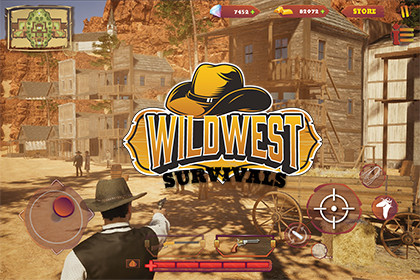
Wild West RPG UI Kit – Mobile Game HUD, Inventory, Shop & Menu System
Enviable Game Studios
$19.99
$29.99
33%OFF
(no ratings)
Jump AssetStore
Complete Mobile Wild West UI Kit for Unity – Modular, responsive HUD, inventory, shop & menu system. Perfect for RPG, survival, cowboy & western-themed mobile games.Mobile RPG Wild West Game UI Kit | HUD, Inventory, Shop & Menu SystemBring Your Wild West Game to LifeCreate a distinctive, polished interface for your next cowboy, Western, RPG, adventure, shooter, survival, or mobile game with a complete Wild West-inspired UI kit for Unity.Mobile RPG Wild West Game UI Kit combines the visual character of the American frontier with the essential interface elements developers need to build engaging game menus, HUDs, inventory screens, shops, and other gameplay interfaces.Instead of creating your game's interface from scratch, start with a professionally designed Wild West visual foundation and customize it to match your game's identity.Why Choose This UI Kit?Wild West-inspired visual designDesigned with mobile RPG projects in mindIncludes essential HUD, inventory, shop, and menu UISuitable for a wide range of Western and RPG game genresFlexible visual foundation for customizationSupports Unity Built-in Render Pipeline, URP, and HDRPCompatible with Unity 2022.3.62f3 and Unity 6000.3.16f1Ideal for indie developers, solo developers, prototypes, and production projectsComplete Wild West Game InterfaceBuild a cohesive interface across your game with UI designed around a consistent Western theme.HUDCreate an immersive gameplay interface for displaying important player and gameplay information.Use the included UI elements to build interfaces for:Player informationHealth and gameplay statusResources and currenciesGameplay indicatorsAction and interaction areasOther HUD elements required by your gameInventoryCreate an organized inventory interface for managing items and equipment.The Wild West visual style makes it suitable for games featuring:WeaponsEquipmentConsumablesCollectiblesResourcesCharacter itemsOther RPG inventory contentShopBuild immersive in-game stores for your Western RPG or adventure game.Create interfaces for:Item purchasingItem browsingPrices and currenciesShop categoriesItem informationBuy/sell interactionsMenu SystemCreate polished menus that maintain a consistent visual identity throughout your game.Suitable for interfaces such as:Main MenuPause MenuSettingsCharacter-related screensGame navigationInformation panelsOther custom game menusDesigned for More Than Western GamesAlthough the visual identity is inspired by the Wild West, the UI can be adapted for many different game types.Use it for:Western RPGsCowboy gamesMobile RPGsWestern shootersAdventure gamesSurvival gamesAction gamesStrategy gamesSimulation gamesCasual gamesIndie game projectsCustomize the interface to match your own gameplay, branding, colors, typography, and overall art direction.Built for UnityThe package is designed for use inside Unity and supports multiple render pipelines.Supported Unity VersionsUnity 2022.3.62f3Unity 6000.3.16f1Supported Render PipelinesBuilt-in Render PipelineUniversal Render Pipeline (URP)High Definition Render Pipeline (HDRP)This makes the UI kit suitable for a wide range of Unity projects and production workflows.Mobile-Focused UIThe interface is designed with mobile game development in mind, making it suitable for projects where clear navigation, readable interface elements, and efficient use of screen space are important.Use the UI as a foundation for portrait or landscape game interfaces according to your project's requirements and layout.Customize It for Your GameThe Wild West styling provides a strong starting point while leaving room for your own game's identity.Adapt the UI to create your preferred:ColorsLayoutsMenusHUD configurationInventory structureShop structureGameplay informationBrandingGame-specific screensCombine the included elements to create your own unique interface rather than being limited to a single fixed game layout.Ideal ForThis UI kit is particularly useful for developers creating:Mobile RPGsCreate a complete Western-inspired interface for your RPG project.Cowboy & Western GamesGive your game an authentic frontier-inspired visual identity.Adventure GamesBuild menus, HUDs, inventory interfaces, shops, and gameplay screens.Indie GamesSave development time by starting with an established UI foundation.Prototypes & Production ProjectsUse the UI during early prototyping or customize it for a full production game.Key FeaturesWild West game UI themeMobile RPG-focused designHUD UIInventory UIShop UIMenu UIModular interface elementsCustomizable layoutsSuitable for multiple game genresBuilt for UnityBuilt-in Render Pipeline supportURP supportHDRP supportUnity 2022.3.62f3 compatibilityUnity 6000.3.16f1 compatibilityTechnical InformationEngine: UnitySupported Unity Versions: 2022.3.62f3, 6000.3.16f1Render Pipelines: Built-in, URP, HDRPPrimary Use: 2D Game UI / GUITarget: Mobile and multi-genre Unity game projectsPackage Size: Approximately 69.1 MBVersion: 1.0For the exact number of UI assets, sprite dimensions, texture formats, fonts, scripts, prefabs, dependencies, and other package-specific technical specifications, please refer to the included package documentation and technical details.Easy to AdaptUse the included interface components as building blocks for your own game.Whether you're creating a small indie Western adventure or a larger mobile RPG, the kit gives you a consistent visual foundation that can be adapted to your project's gameplay and design requirements.CompatibilityThis asset is currently listed as compatible with:Unity 2022.3.62f3Built-in Render PipelineUniversal Render PipelineHigh Definition Render PipelineUnity 6000.3.16f1Built-in Render PipelineUniversal Render PipelineHigh Definition Render PipelineImportant InformationThis package is a UI/GUI asset kit and does not automatically provide a complete gameplay system, RPG framework, inventory backend, shop economy, player controller, or game logic unless specifically included in the package.The included UI should be connected to your game's existing gameplay systems and logic according to your project's requirements.Start Building Your Wild West GameGive your Unity project a distinctive frontier identity with a UI kit designed around the needs of Western and RPG games.Build your HUD. Customize your inventory. Create your shops. Design your menus.Start with the Wild West aesthetic and make it your own.Supported Unity VersionsUnity 2022.3.62f3Unity 6000.3.16f1Supported Render PipelinesBuilt-in Render PipelineUniversal Render Pipeline (URP)High Definition Render Pipeline (HDRP)The asset is designed to integrate into Unity projects using any of the supported render pipelines listed above.Asset TypeCategory: 2D / GUIPrimary Use: Game UI / User InterfaceTheme: Wild West / Cowboy / RPGTarget Platforms: Mobile-focused Unity projectsUse Cases: RPG, Western, Adventure, Action, Shooter, Survival, Strategy and Simulation gamesIncluded UI SystemsThe package is designed around the core interface requirements of a mobile RPG and includes UI components for:HUDInventoryShopGame MenusNavigation InterfacesGameplay InformationRPG Interface ElementsCustom Game ScreensThe included elements can be combined and customized to create interfaces tailored to your game's gameplay and visual identity.UI DesignThe interface follows a cohesive Wild West-inspired visual direction designed to provide a consistent look across different game screens.The UI can be adapted for different game requirements, including:Gameplay HUDsInventory screensItem interfacesShop interfacesMenu screensInformation panelsCharacter-related interfacesCustom gameplay screensCustomizationThe UI is intended to be used as a flexible visual foundation rather than a fixed interface.Depending on your project requirements, you can customize and rearrange the available interface elements to create your own:HUD layoutsInventory layoutsShop layoutsMenu structuresInformation panelsGame-specific screensNavigation layoutsVisual hierarchyThis allows developers to adapt the visual system to their own gameplay and branding.Mobile UI ConsiderationsThe asset is designed with mobile game interfaces in mind.When implementing the UI in your project, developers can configure their Canvas, anchors, scaling settings and layouts according to their target device resolutions and aspect ratios.For best results, configure the Unity Canvas and Canvas Scaler according to the resolution and orientation requirements of your game.Recommended testing should include the target devices and aspect ratios supported by your project.Render Pipeline CompatibilityBuilt-in Render PipelineCompatible with Unity's Built-in Render Pipeline for projects using the standard Unity rendering workflow.Universal Render PipelineCompatible with URP-based Unity projects and suitable for modern mobile-focused workflows.High Definition Render PipelineCompatible with HDRP projects where the UI is used alongside high-fidelity 3D environments and gameplay.Package SizeApproximate Package Size: 69.1 MBThe package size may vary depending on the Unity Asset Store package version and included content.Unity Version CompatibilityUnity VersionBuilt-inURPHDRPUnity 2022.3.62f3✓✓✓Unity 6000.3.16f1✓✓✓Always test the package in your target Unity version before beginning production integration.Project IntegrationThe UI kit is intended to be integrated into an existing Unity project.Typical integration workflow:Import the package into your Unity project.Open the included UI assets and relevant scenes/content.Review the available UI components.Select the screens and elements required by your game.Configure the UI hierarchy and layout.Connect the visual UI to your existing gameplay systems.Customize the interface to match your game's requirements.Test the interface on your target resolutions and devices.Gameplay System IntegrationThis package provides the UI/visual interface foundation.Unless explicitly included in the package, the following gameplay systems are not automatically provided:Player controllerRPG progression systemInventory backend/databaseItem management logicShop/economy logicCurrency managementSave/load systemCharacter statistics systemGameplay interaction systemMultiplayer/networking systemDevelopers can connect the UI to their own gameplay systems or existing frameworks.Performance & OptimizationUI performance depends on how the interface is implemented within the final project.For mobile projects, developers should follow Unity UI optimization practices, including:Avoiding unnecessary UI elements being active simultaneouslyLimiting excessive Canvas rebuildsUsing appropriate Canvas organizationAvoiding unnecessary transparent UI layersOptimizing large UI textures where appropriateTesting on the actual target mobile hardwareDisabling or removing UI elements that are not requiredPerformance can vary depending on the final UI configuration, project settings, target device, resolution, and other assets and systems running in the project.Resolution & ScalingThe UI should be configured according to your project's target resolution and aspect ratio.For mobile projects, recommended implementation practices include:Configure the Canvas Scaler appropriatelyUse anchors for responsive positioningTest portrait and landscape layouts when requiredTest multiple aspect ratiosVerify readability on different screen sizesTest touch interaction areas on physical devicesActual responsiveness depends on the final Canvas hierarchy and layout configuration implemented by the developer.Customization WorkflowThe asset can serve as a starting point for creating a complete game-specific interface.Developers can combine available UI components to create:HUD → Inventory → Shop → Character → Menu → Settings → Gameplay ScreensThe visual system can be adapted to fit different Western, RPG and mobile game concepts.DependenciesRequired External Assets: None unless otherwise specified by the package documentation.If your project uses additional frameworks, systems, fonts, plugins or third-party assets to implement gameplay functionality, those dependencies should be installed and configured separately.Third-Party ContentPlease refer to the included documentation and package notices for information regarding any third-party content, licenses or dependencies included with the package.Where applicable, third-party licenses and notices are provided with the asset.DocumentationThe package documentation should be consulted for:InstallationPackage structureUI setupCustomizationIntegrationCompatibilityTroubleshootingThird-party noticesAdditional technical informationVersion InformationCurrent Version: 1.0Release Date: July 7, 2026Future updates may add improvements, additional UI components, compatibility updates, bug fixes or other enhancements.Important Compatibility NoteAlthough the asset is listed as compatible with the Unity versions and render pipelines specified above, Unity projects can contain different packages, project settings, third-party frameworks and custom configurations.Always test the asset in your intended production environment before deployment.Technical SummarySpecificationDetailsAsset Type2D / GUIUI ThemeWild West / Cowboy / RPGPrimary TargetMobile Game DevelopmentUnity 2022.3.62f3✓Unity 6000.3.16f1✓Built-in RP✓URP✓HDRP✓HUD✓Inventory UI✓Shop UI✓Menu UI✓Package Size~69.1 MBVersion1.0Release DateJuly 7, 2026Developer NoteThis asset is primarily a UI/GUI visual kit. It provides the visual foundation for creating a Wild West-themed game interface, while gameplay functionality and data systems should be connected according to the architecture of your Unity project.For the best results, test the UI on your target devices and resolutions and customize the included components according to your game's specific requirements.AI tools were used to assist in generating certain UI button graphics and a limited number of logo design elements included in this package. All AI-generated assets were reviewed, refined, and, where necessary, modified to ensure originality, quality, and compliance with Unity Asset Store Submission Guidelines. No gameplay logic or core functionality was generated by AI.

