



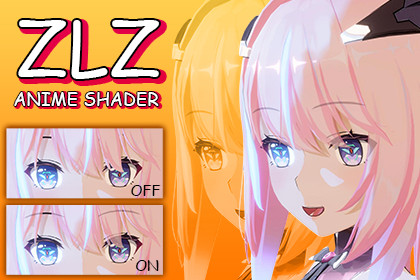
Anime-style character shader for URP that improves facial clarity with transparent hair, featuring easy-to-toggle options for performance optimization.Rendering PipelineUniversal Render Pipeline (URP)Forward RenderingForward+ RenderingIf you are developing an anime-style game or animated film and encounter the problem of hair covering the face, to the point where it becomes impossible to fully convey the charm and identity of the character,in anime-style works, we all know that “the face” is the most important element.Being able to clearly see the eyebrows, eyes, and emotions of the character is what brings the character to life and allows them to truly communicate with the player.ZLZ Anime Shader was created specifically to solve this problem to make the character’s face clear and easy to read, while preserving the true beauty at the core of authentic anime visuals.-------------------------------------------------------------------------------🚀 ZLZ Anime Shader was developed based on three core principles:Enhance character visuals with transparent hair for clear facial visibilityEasy to use with ready-to-use Material Setup presets (one-click setup)Easy to optimize by toggling features for low-spec mobile devices-------------------------------------------------------------------------------▶ Demo (WebGL | 1920 ×1080) : DemoShowcasing the rendering results of ZLZ Anime Shader on WebGL-------------------------------------------------------------------------------⭐ Highlight Features ⭐Hair Transparent : Transparent hair rendering for clear facial visibilityCharacter Contact Shadow : Depth-based shadowing for hair and character detailsTone Mapping : Stylized tone control for anime, cartoon, and cinematic visuals-------------------------------------------------------------------------------🧩 FeaturesBase Character Colors : Direct control over base and shadow colorsFace Shadow : Supports a wide range of characters without UV concernsReceive Realtime Shadow : Supports realtime shadows from scene lightingLighting : Supports Main Directional Light and Additional LightsToon Shade Ramp : Controls sharpness and smooth light-shadow transitionsOutline (Hull) : Mesh-based character outline with controllable thickness and colorOutline (Screen Space) : Post-process outline with controllable thickness and colorNormal Map : Adds detailed surface lighting and depth to materialsSpecular : Adds stylized highlights to materials for shine and depthMetallic : Tuned metallic surface support for anime-style materialsShadow Edge : Enhances the transition between light and shadowHair Highlight : Adds stylized highlights to hair for shine and depthEmissive : Controls emissive color and intensity for special effectsTransparency : Supports transparent materials for special use casesSoft Light : Soft additive lighting to enhance skin smoothnessRim Light : Rim lighting to separate the character from the backgroundLight Sweep : Sweeping light effect for weapons or special moments-------------------------------------------------------------------------------✨FX RuntimeOutline Selection : Highlights selected characters with a customizable outline effectDither Camera Fade : Uses dither fading on nearby objects to improve visibilityDither Occlusion Fade : Fades obstructing objects to improve character visibilityDissolve : Dissolve effect for character appearance and disappearanceTarget Darken : Darkens the character to emphasize targets or key scenesIndicator : Visual indicator effects for character states or targetsGet Hit : Reactive visual effect when the character is hitUpgrade : Visual effects for character or equipment upgrades-------------------------------------------------------------------------------🛠️ ToolsCharacter Dashboard : Centralized tools for faster character setup and workflowShader Optimizer : Analyze Shader Cost, Texture Usage, and optimize performance easilyTexture Mask Packer : A tool designed to simplify texture mask creation and management.-------------------------------------------------------------------------------✅ Material PresetsZLZ Anime Shader comes with carefully designed Material Presets to help you get started immediately, reduce setup complexity, and quickly fine-tune the visual style.Presets for anime-style characters, ready to use out of the boxPresets separated by usage type, such as hair, skin, and special materialsDesigned to be versatile and flexible, allowing customization to match each project’s art styleSaves setup time with one-click setup buttons that activate usable feature presets instantly-------------------------------------------------------------------------------⚡ Performance & OptimizationThe shader is designed with real-world game usage in mind:The shader is built using Shader Code to allow full control over structure and performanceEvery feature is designed to be as efficient as possible for practical useEasy to optimize by enabling or disabling features based on actual usageDisabled features are stripped out during compilation, resulting in no unnecessary calculations-------------------------------------------------------------------------------📌 Website : https://zlz-studio.github.ioThe website includes:- User documentation and usage guides- A Web Demo for testing and hands-on experience- Showcases of games using this shader- Contact information and support channels-------------------------------------------------------------------------------✏ DocumentationWe provide documentation to ensure you never get lost during usageIncludes both YouTube video tutorials and detailed written documentation with visual referencesDocumentation - Setup Character : https://zlz-studio.github.io/setup-character/Documentation - Features : https://zlz-studio.github.io/features/Video Tutorial : Tutorial-------------------------------------------------------------------------------📧 SupportIf you encounter any issues or have further questions,please contact: zlzstudio.production@gmail.comThank you for supporting ZLZ Anime ShaderAI tools were used in a limited capacity during the creation of this package.The following assets were generated or assisted by AI tools:- Assets/ZLZ_AnimeShader/Textures/T_BakeSimpleNoise.png (AI-assisted noise texture generation)- Assets/ZLZ_AnimeShader/Demo/Sprite/ZLZ_Icon.png (AI-assisted icon base generation, manually refined and edited)All AI-generated content was reviewed, refined, and integrated manually to ensure originality, quality, and compliance with Unity Asset Store guidelines.

