


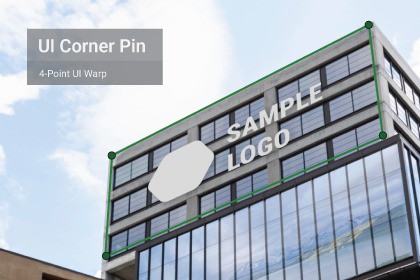
4-point UI Corner Pin / Perspective Warp for Unity uGUI, with Feather, Chroma Key and Blend Modes.
Requires included CornerPinRawImage / CornerPinRawVideo prefabs (standard UI Image is not supported).Built-in / URP / HDRP compatible (uGUI).Requires the included CornerPinRawImage / CornerPinRawVideo prefabs (subdivided UI mesh). Standard Unity Image/RawImage alone will not warp.UI Corner Pin / Perspective Warp is a projection-mapping style tool for Unity uGUI that allows you to warp UI images and videos in perspective using a 4-point corner pin workflow.It is designed for runtime mapping and alignment, making it suitable for:Projection mapping previews and mockupsEvent and installation setupsPerspective UI overlays and screen compositionsMulti-layer UI projection mappingThe asset includes dedicated prefabs for both images and videos:CornerPinRawImage for image-based mappingCornerPinRawVideo for video mapping using Unity’s VideoPlayerThese prefabs use a subdivided UI mesh required for proper perspective deformation.Included features:4-point corner pin perspective warpFeather blending using mid-edge handlesChroma Key for green screen contentMultiple blend modes (Normal, Add, Multiply, Screen)Multi-layer demo scenes with per-layer controls and presetsImportant limitation:This asset does not work with Unity’s standard UI Image or RawImage components.Perspective deformation requires the included CornerPinRawImage or CornerPinRawVideo prefabs.Demo scenes are included to showcase image mapping, video mapping, feather blending and multi-layer projection workflows.UI System: Unity uGUI (Canvas), not UI ToolkitWarp Type: 4-point corner pin (perspective warp)Image Mapping: CornerPinRawImage prefab (included)Video Mapping: CornerPinRawVideo prefab (included, uses VideoPlayer)Standard Image / RawImage components are not supportedFeather blending with mid-edge handles and feather powerChroma Key with adjustable threshold, softness and spillBlend Modes: Normal, Add, Multiply, ScreenMulti-layer demo with per-layer save/load presets (corners, feather, transform and compositing options)Works in any render pipeline using uGUI: Built-in / URP / HDRPUnity 2021+ (tested in Unity 2022)AI/ML usage: Used for assistance with marketing copy / product description text only.No AI-generated art, textures, models, or code.

