




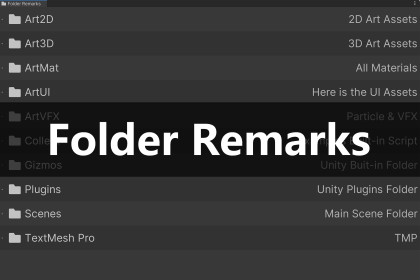
Downloaded too many assets? Forgot what those vague folder names mean? Simply drag them into this list and add a quick note. A lightweight, stress-free way to label your project.💢 "What is this folder inside Plugins?"😫 "Which asset pack contains the trees I liked?"We have all been there. You download amazing tools and art packs from the Asset Store, but a few weeks later, your Project window becomes a maze of confusing folder names.Folder Remarks is a chill, lightweight utility designed to solve this specific headache. It acts like a Sticky Note for your directories.Just drag that confusing folder into the list and type: "This is the Water Shader," or "Don't delete this, used in Level 2."Solve the Mystery:No more clicking through folders trying to guess what's inside. Label them once, remember them forever.Asset Store Companion:Perfect for organizing the dozens of plugins, SDKs, and art packs you've imported but lost track of.One-Click Ping:Click your note, and it instantly highlights the folder in the Project view. Navigate instantly.Super Lightweight:It’s just a simple Editor Window. No background processes, no runtime code, no bloat.Clean & Simple:A minimalist tool that does one thing and does it well. Keeps your mind clear.🎯 Design Philosophy: Why a separate list window?You might ask: "Why not just show the remarks directly on the folders in the Project view?"Maximum Compatibility:By keeping the UI separate, we ensure zero conflicts with other popular folder-coloring or UI-beautification plugins.The "Inventory" Strategy (Most Important):If remarks were just attached to folders, they would still be hidden inside hundreds of other directories. You would have to scroll through your entire project to find them.Folder Remarks is designed to be a Manifesto of your tools.I created this because I often wasted weeks coding a feature, only to realize months later that I had already downloaded a high-quality asset that did exactly that—it was just hiding in a folder I forgot about. This tool brings those "hidden gems" out of the shadows and into a centralized list, ensuring you actually use the tools you possess.SupportDocumentation | Discord | Email🎁 Free & HelpfulI made this tool because I needed it for my own projects, and I decided to share it for free.If you enjoy the efficiency of Folder Remarks, check out my premium tools designed to speed up your level design and hierarchy management:❤️ Dynamic Particle Preview | VFX Browser - Real-time Dynamic ThumbnailsPossibly the only VFX Browser on the Asset Store that supports real-time thumbnail playback for Particle Systems and VFX Graphs.💜 Quick Drag & Drop | Level Placer - 10x your level design speedAre you tired of wasting 50% of your time clicking through deep folder hierarchies just to find one rock or tree? Level Placer is designed for one purpose: To make Level Design 10x Faster.💚 Root Select Locker - Stop selecting child objects by mistakeAre you tired of accidentally selecting a door handle when you meant to move the whole house? Or dragging a child mesh instead of the character root? Root Select Locker is a lightweight, editor-only workflow tool designed to solve the most frustrating part of level design: Accidental Child Selection.Compatibility: Unity 2019, 2021, 2022, 2023, Unity 6.Render Pipeline: Compatible with Built-in, URP, and HDRP.Performance: Zero runtime overhead. The script only runs in the Editor.Source Code: Full C# source code included.I used AI as a coding assistant to help generate utility methods and assist with debugging. All final scripts have been manually reviewed, tested, and optimized by me to ensure they function correctly within Unity. No AI was used in the creation of any visual or media assets.

