




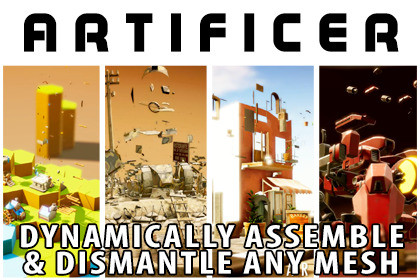
Dynamic Object assembly & dismantling with mesh splitting and destruction. Spawn objects in engaging ways, remove them seamlessly, perfect for RTS, tower defense, and strategy games.Videos | Docs | API | Discord | Forum | SupportNote: The assets shown in the example videos are not included in the Asset.Bring your Unity scenes to life with dynamic object assembly and dismantling! This system lets you spawn, build, and remove objects in visually interesting ways, giving your RTS bases, tower defense upgrades, destructible props, game characters or cinematic sequences a level of polish ordinary pop-in objects can’t match.Works on all versions of Unity from 2022.1 to 6.5+ and on all Pipelines and PlatformsKey FeaturesWorks with any mesh — single, multiple objects, skinned, or LOD meshes, no prep required.Super fast — optimized with Burst and Jobs for runtime splitting and dismantling.Multiple assembly and dismantle styles, plus numerous splitting options including custom setups.Full control over assembly animations: speed, order, direction, scaling, rotation, and easing.Chain assemblies and dismantles for complex multi-part objects.Unity Splines support for precise paths and builds.Custom assembly scripts and events system for complete integration with your gameplay.Automatic handling of lights, audio, particles, and line renderers.Enable/disable pieces during builds, explode objects with physics, and auto-remap materials for complex meshes.Profiles for runtime variation, fine-grained control per element, and easy script-based control.Test everything instantly in Edit Mode — no play mode required.Full Undo support, tooltips, right-click help, and complete documentation with tutorials.Explode your meshes easily.Build objects in sections or by clicking for single placementsInstant build option to any levelWhy You’ll Love ItCreate objects dynamically — assemble and remove them naturally instead of popping them in.Perfect for gameplay: RTS bases, tower defense upgrades, interactive props, and destructible environments.Highly flexible — works with any pipeline, platform, or mesh setup.Fast iteration — prototype quickly, chain builds, and experiment in-editor or at runtime.With this system, your objects don’t just appear—they build, break, and interact naturally, giving your projects dynamic, engaging, and polished visuals. Make construction, destruction, and object spawning a highlight of your game!Online Documentation - Extensive Docs with API references as wellVideos - Lots of examples and help videosDiscord - Ask any pre purchase questionsKnown Issue:In Unity 2022 and 2023 the Scene View Playback of the animation may leave trails.Supported Mesh Types:Single meshes, multiple meshes, skinned meshes, and LOD meshesNo mesh preparation requiredAssembly & Dismantling Features:Fully runtime-capable: assemble, dismantle, and split meshes during gameplay or in-editorMultiple built-in assembly and dismantle stylesCustom assembly scripts support for full flexibilityChain assemblies and dismantles for complex multi-part objectsFull control over build order, speed, rotation, scaling, and directionVolume-based or user-defined selection of mesh elementsProfiles per mesh for runtime variationMesh Splitting:Numerous automatic splitting options: slicing, shattering, and debris generationCustom splitting support for unique requirementsFast and optimized using Unity Burst and JobsRuntime and editor-mode splitting supportedIntegration & Control:Unity Splines support for complex paths and dynamic buildsEvent system for interacting with assembly/dismantling actionsScriptable control for piece-by-piece or group-based assemblyAutomatic handling of lights, audio, particles, and line renderersEnable/disable objects during assembly for dynamic effectsExplode objects with physics and collision supportEditor & Workflow:Test assembly and animations instantly in Edit ModeFull Undo support for all operationsComplete tooltips and right-click help for every optionFull documentation and numerous tutorial videos includedPerformance & Compatibility:Super-fast with Burst and JobsWorks on all pipelines (Built-in, URP, HDRP) and all platformsMinimal overhead even with dozens of meshes or complex buildsAdditional Features:Auto-remap materials during buildsOptions for different values per mesh part for precise controlEasy setup: as little as 2 clicks to get workingFully modular and extensible system for custom gameplay or VFXBuilt In HelpFull Tooltips

