




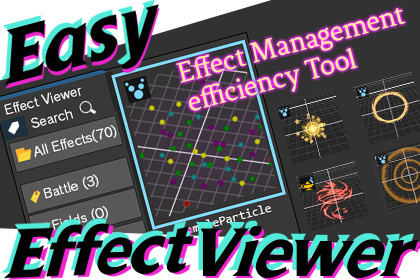
Easy Effect Viewer displays Particle System, VFX Graph, and UI Prefab assets as thumbnails in your Project window. Preview and play effects right in the Inspector — no scene setup needed.WebSite | DiscordEasy Effect Viewer is a tool designed to make effect and UI asset management within your projects smarter.🔍 Key Features■ Automatic Thumbnail Generation & Listing (ParticleSystem / VFX Graph)Automatically detects ParticleSystem and VFX Graph assets in your project, captures thumbnails of the effect during playback, and displays them as a list. With thumbnails, you can find the effect you want at a glance — a real boost to development efficiency.■ UI Prefab Thumbnail Display (New in v1.1.0)Render your UI Prefabs — buttons, panels, full-screen canvases — as thumbnails directly in the Project window, so you can browse your UI assets visually without opening each prefab.Automatic generation — thumbnails are generated and refreshed automatically when a UI prefab is imported or modified (toggle on/off in settings).Manual generation — right-click any prefab and choose UI Viewer ▸ Generate Thumbnail (or Clear Thumbnail) for on-demand control.Batch regeneration — regenerate every UI thumbnail in the project at once from Tools ▸ UIViewer ▸ Regenerate All UI Thumbnails.Smart UI detection — any prefab whose root is a RectTransform and that contains a Canvas, Image, Button, Text, or TextMeshPro element is recognized as UI. Full-screen Canvas-root prefabs are captured at higher resolution for crisp previews.Live Inspector preview — selecting a UI prefab shows a "UI Preview" tab at the bottom of the Inspector. The preview re-renders automatically when the source prefab changes, and can be refreshed manually with the Update button.■ Tagging & FilteringFreely assign tags based on how you use each asset. Classify effects into categories like "Explosion," "Sparkle," or "For UI," then narrow down to exactly what you need with a single click on a tag. Tagging works via drag-and-drop or right-click, keeping the workflow intuitive.■ Inspector Preview & PlaybackWhen you select a Prefab in the Project window, you can play its effect directly at the bottom of the Inspector — no need to drop it into a scene first. Supports:Playback control (play / stop) and adjustable playback speedCamera operations: zoom, rotate, and panCapturing the current preview frame and setting it as the asset's thumbnailThis makes verifying effects fast and friction-free.🎯 Recommended ForTeams using many imported assets who want to find the right effect quickly in a crowded project.Studios who want to organize effects and UI in a shareable way across artists, designers, and engineers.Anyone who picks assets by their visual atmosphere — something text search alone can't capture.🧰 Supported EnvironmentsSupports Built-in, URP, and HDRP.✅ Works on Unity 2022.3.62f1 through Unity 6.⚠️ May not be compatible with Unity versions earlier than 2022.3.62f1AI tools were used for writing comments and improving code within the source code.

