






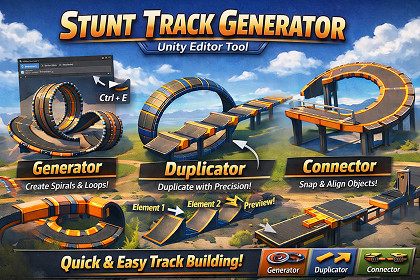
Stunt Track Generator is an Editor tool that helps you build stunt/track layouts fast by generating spirals/loops, duplicating pieces with consistent spacing, and snapping a new pieces.DocumentationStunt Track Generator is a Unity Editor window designed for quickly assembling stunt tracks, obstacle courses, and modular layouts using your own prefabs or scene objects. It includes three focused tools:Generator: creates a spiral/helix chain (great for loops/corkscrews) with control over loops, radius, spacing, offset travel, and gradual rotation.Duplicator: repeats a piece forward using the spacing/rotation defined by two reference objects—ideal for extending straights, ramps, or modular sequences.Connector: spawns one new piece aligned to a chosen face of the source object using mesh bounds, with rotation/position offsets for quick fine-tuning.Each tool supports live preview in the Scene view before committing, and actions are grouped under Undo, making iteration fast and safe. Suitable for racing/stunt games, platformers, and any modular environment workflow.Editor window with 3 tabs: Generator, Duplicator, ConnectorScene view live preview toggle per toolGenerator (spiral/helix placement)Parameters: Loops, Radius, Objects count, Offset (travel), Continuous RotationOrientation controls: Center Side + Direction (build axis/travel direction)Auto count estimates object density from mesh bounds + path lengthOutput grouped under STG_Generated_Duplicator (spacing from 2 references)Copies placed using the vector from Element 1 → Element 2Rotation extrapolated between the two reference rotationsOutput grouped under STG_Duplicated_Connector (snap-to-face)Attach Side: Right/Left/Top/Bottom/Forward/BackRotation Offset + Position Offset, plus quick 90° rotation preset buttonsOutput named _Connected and auto-selectedPrefab-aware instantiation (uses prefab source when available)Undo grouped per operation (Generate/Duplicate/Connect)AI tools (CoPilot) were used during development to assist with drafting documentation and refining editor UX/text (and optionally for code suggestions/refactoring during implementation). The final code and behavior were reviewed and validated by the developer in Unity.

