






NGO Multiplayer Starter Pack - Lobby & Role System
Sander Teuthof
$9.99
(no ratings)
Jump AssetStore
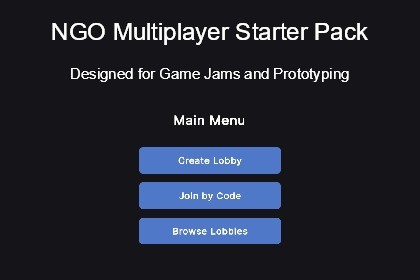
Prototype-ready multiplayer foundation using Netcode for GameObjects. Lobby system, role assignment, spawn management. Setup in 30 minutes.There is one material in there, that's just the color of the floor in the example play scenes, it is thus not important. Besides that we do not interact with the Render Pipelines. After my last Game Jam where I wanted to make a multiplayer game, but had to pivot it to a bad singleplayer game last minute due to not getting the multiplayer to work properly, I wanted to make a template that I can use to be able to quickly make Game Jam multiplayer games, or start prototyping quick for bigger projects. And this is that template.So, stop spending days setting up lobby systems, relay connections, and spawn management. This starter pack gives you a multiplayer foundation so you can focus on what makes your game unique.Get your multiplayer prototype running in 30 minutes instead of 3 days.What You GetComplete Lobby SystemUnity Lobby & Relay integration (no backend server needed)Create/join lobbies with codesBrowse public lobbiesPlayer customization (name, color) that persists to gameplayAutomatic disconnection handlingTwo Multiplayer ModesStandard Mode: All players use the same prefab (FFA, co-op games)Role-Based Mode: Different prefabs per role (asymmetric gameplay like Among Us, Dead by Daylight)Flexible Spawn SystemsEasy-to-extend interface for custom spawn patternsCircular spawn provider (symmetric starts)Predefined position provider (fixed spawn points with role assignment)Session ManagementPause menu with proper network cleanupHost disconnect detection (clients auto-return to lobby)Connection approval with custom player data transferModern UIComplete UI Toolkit interfaces (lobby, role selection, pause menu)Responsive designEasy to restyle with USSClean ArchitectureSOLID principles throughoutWell-commented code designed to be read and modifiedClear separation of concernsScriptableObject-based configurationWho This Is ForPerfect for:Game jam developers who need multiplayer fastIndie developers prototyping multiplayer conceptsThose still learning wanting to understand NGO properlyTeams building asymmetric multiplayer gamesIdeal if you:Are comfortable with Unity basics and C# intermediate conceptsUnderstand what Netcode for GameObjects is (or want to learn it properly)Want a foundation to build upon, not a complete game frameworkPrefer reading well-structured code over watching 3-hour video tutorialsWhat This Is NOTThis is NOT a complete game frameworkYou'll need to implement your actual game mechanics (shooting, inventory, abilities, etc.)This is NOT plug-and-playYou'll customize the player prefabs, spawn logic, and UI to match your game. It's designed to be modified.This is NOT optimized for massive multiplayerTested and designed for 2-8 players. Works great for co-op and small competitive games.This is NOT a visual scripting solutionYou need to be comfortable reading and modifying C# code.FeaturesUnity Lobby & Relay integration (no dedicated server required)Role-based and standard multiplayer modesConnection approval with player data transferFlexible spawn system (circular, predefined, custom)Complete UI Toolkit interfacesPause menu with session managementPlayer customization (name, color, extensible)ScriptableObject-based configurationFull source code includedUnity Version CompatibilityDeveloped and tested on:Unity 6000.5.2 Fully testedLTS version compatibility:Unity 6000 and onwardsIf you test on other versions, please share your results in the reviews/questions - helps the community!Required PackagesInstall via Unity Package Manager:Netcode for GameObjects 2.7.0 (or compatible)Multiplayer Services 1.2.0 (or compatible)Unity ServicesRequires Unity project linked to Unity Gaming Services (UGS):Free tier sufficientUsed for Lobby and Relay services onlyNo credit card requiredSupported PlatformsTested:Windows Standalone ✅Expected to work (architecturally compatible, not tested):macOS StandaloneLinux StandaloneiOS (requires UGS mobile setup)Android (requires UGS mobile setup)Not designed for:WebGL (Netcode for GameObjects limitation)Consoles (requires platform-specific networking integration)Community testing welcome - share your platform results in reviews! (This is just from what I googled, it could be wrong)Supported Operating SystemsTested:Windows 10/11 ✅Expected to work:macOS 10.15+Ubuntu 20.04+Network RequirementsInternet connection for Unity Lobby/Relay servicesSupports 2-8 players comfortablyWorks over LAN and Internet via Unity RelayDocumentationIncluded in package:README.md - Architecture overview, system explanationQUICKSTART.md - 30-minute setup guide with step-by-step instructionsInline code comments throughout all scriptsNo external documentation website - everything you need is in the package.Performance CharacteristicsDesigned for 2-8 playersLow bandwidth overhead from framework itselfNetworkVariable updates: position/rotation only (customize as needed)No physics synchronization included (add your own via NetworkTransform)AI is mainly used to add clearer documentation inside of the code, and in the README files. Minor coding help from LLM to speed up the process.

