






Character Select Kit - ScriptableObject driven, plug and play!
GeAr Development
$6.99
(no ratings)
Jump AssetStore
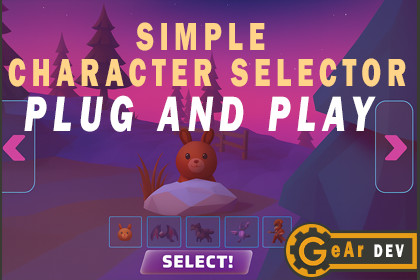
Plug-and-play character selector driven by ScriptableObjects. Gamepad + mouse support, instant or slide transitions, PlayerPrefs/JSON saving, demo scene includedSimple Character Selector — ScriptableObject Driven, Plug & PlaySimple Character Selector is a drop-in character selection screen designed to get you from “no menu” to “production-ready selector” in minutes.Just plug in your character prefabs and ScriptableObjects and you’re done — it works out of the box with mouse, keyboard and gamepad using the New Input System.What it doesA complete 3D character selection scene: main character showcase, thumbnail strip and “Select” button.Ready-made character select screenEach character is defined via a ScriptableObject (CharacterData): prefab, display name, description, portrait and optional ID. No hard-coded references.ScriptableObject-driven dataSwap between characters with left/right slide transitions driven by an AnimationCurve. You can also disable transitions for instant changes.Smooth slide transitionsNavigation with left stick or shoulder buttons, rotation with right stick, zoom and scroll wheel support out of the box (Unity New Input System).Gamepad, mouse and keyboard supportRotate the active character freely to show off your models. Perfect for 3D characters, skins or cosmetic items.360° character showcaseSmooth zoom in/out by changing the camera field of view (right stick Y + mouse wheel), with configurable min/max FOV and speeds.FOV-based zoomOptional toggle to enable/disable automatic camera follow.Smart camera focusThe camera automatically looks at a Head tagged Transform on your prefab. If none is found, it falls back to the combined bounds center of the model.Automatic thumbnail buttons generated from your character list, with visual highlight for the currently selected character.Thumbnail strip with highlightSaves the selected character using PlayerPrefs or a JSON file. Loading tries by ID, then name, and finally by index, so your selection survives content changes.Selection persistenceVisualize slide positions, character bounds and holder placement directly in the Scene view for easier tuning.Editor gizmos for layoutCustomizationWorks with any 3D or 2D character prefab (humans, creatures, vehicles, weapons, etc.).Easy to reskin: replace the UI sprites, fonts and colors to match your game’s art style.All key behaviours are exposed via inspector fields and clean C# methods (rotation, zoom, navigation, saving).Action, RPG, platformer, roguelite, multiplayer, party games, etc.Suitable for almost any genre that needs character or skin selection:Package contentsCharacterSelectionManager main C# script.CharacterData ScriptableObject definition.Example scene with a ready-made character selection layout.Sample characters, thumbnails and UI setup to use as a reference or starting point.Does not includeThis package focuses on technical code and development only; all characters, environments and artwork shown in screenshots are for demonstration purposes and are not included in the asset.ScriptableObject-driven character data (prefab, name, description, portrait, ID).Drop-in CharacterSelectionManager with clean C# API (rotation, zoom, navigation, save/load).Smooth left/right slide transition between characters (distance, duration and easing curve configurable).Gamepad, mouse and keyboard support via Unity New Input System (sticks, shoulders, wheel).Character rotation around Y axis for 3D model showcase.Camera FOV-based zoom (min/max FOV, stick speed, wheel step, invert option).Smart camera focus: looks at a Head tagged Transform, or falls back to combined renderer bounds.Optional continuous camera follow toggle (enable/disable from inspector).Automatic thumbnail strip generation with highlight for the active character.Selection persistence through PlayerPrefs or JSON file in Application.persistentDataPath.Scene view gizmos to visualize slide positions and character bounds.Example scene, sample ScriptableObjects and UI setup included as a reference implementation.

