






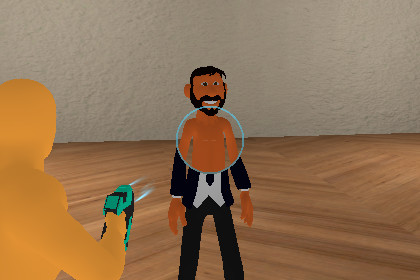
ShaderObject allows you to create a “see-through” effect by revealing areas on surfaces where the ray hits. This can be used for effects such as looking through walls or even revealing 3D characters.SeeThroughShader creates a see-through effect by revealing surface areas hit by a ray, useful for visual effects like looking through walls or revealing hidden 3D objects or characters. It also includes several customizable features listed below.Free Active FeatureWhat it does:When true, the player can emit the raycast and trigger the shader effect without first switching/activating the weapon.When false:The weapon must be activated (or the gun enabled) before the raycast will produce the see-through effect.Usage tip:Set Free Active Bool = true for debugging or tools where you want instant testing. Set it to false for game modes where the effect should only work while the weapon is active.Shader Size FeatureWhat it does:Controls the final radius/size of the hole created by the shader — i.e., how large the see-through area becomes.Effect:Larger values = larger visible hole.Usage tip:Use this with Shader Fade Speed to create smooth growth from impact point to full size.Shader Border Size FeatureWhat it does:Controls the thickness of the outline (a circular border) drawn around the see-through hole.Usage tip:Increase border size to emphasize the effect, or keep it small for a subtle cutout.Shader Fade Speed FeatureWhat it does:Determines the lerp speed of the shader effect from its initial state to the Shader Size. Example behavior:With a small initial hole, the shader will interpolate (grow) to Shader Size at the rate controlled by this parameter.Ray Distance FeatureWhat it does:The maximum raycast length used to detect targets. The shader effect only triggers when the raycast hits an object within this distance. Effect:Shorter distances limit the effect to close targets; longer distances allow far targets to be affected.Shader Mask FeatureWhat it does:A layer mask that restricts which objects the shader system will detect and affect. Only objects on layers included in this mask will respond to the raycast and show the see-through effect. Usage tip:Use the mask to avoid unintended objects being affected and to optimize performance by raycasting only against relevant objects.⚠️ This package is only supported with Unity URP (Universal Render Pipeline).

