






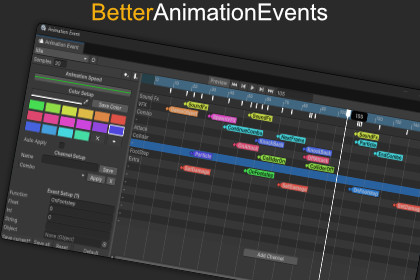
This tool is designed to edit Animation Events in the Animator more efficiently, giving you greater control with far less hassleDocumentation | DiscordWorking with animation events in Unity can get messy fast, especially when you’re dealing with complex action systems, dense timelines, or rapid iteration. I created this tool to solve those problems in my own game, and it’s designed to give you the same smoother, more reliable workflow.This editor provides a clean, scalable way to work with Animation Clips that contain multiple events, without fighting the native UI. Everything is optimized for speed and clarity, so even heavy clips remain easy to navigate.Key FeaturesEfficient, Intuitive EditingDrag & drop event editing directly in the timeline.Copy & paste events in the timeline or paste them to other clips.Timeline zoom controls to dial in precision or view the bigger picture.Quick event preview by hovering for instant details.Built for ScaleOptimized to handle hundreds of events smoothly, without slowdown.Color-code events for clarity when working with dense clips.Sort your animation list by name, creation date, or last modified date.Organized WorkflowGroup and manage events using customizable channels.Save channel sets with Channel Templates and apply them to other clips for consistent structure.Lock the editor window to prevent selection changes while focusing on one clip.Works Directly With FBX AnimationsNo need to manually extract or recreate clips. Just select the one you want, and the tool handles the duplication for you.With a click of a button tool Automatically duplicates Animation Clips stored inside an FBX, so you can edit them freely.Safe, Non-Destructive EditingAll edits are stored separately from the original asset in a ScriptableObject.Your progress is always preserved.Faster IterationBatch editing lets you modify multiple events at once.Animation Speed Curve allows you to preview timing changes on the fly.Zero setup. Just import the tool and start using it.Current FeaturesDrag & drop editing: create, move, and adjust events directly in the timeline.Optimized for scale: handle hundreds of events smoothly, with no lag.Non-destructive workflow: edits are stored separately from the original asset.Batch editing: modify multiple events at once.Safe editing: never lose progress.Zoom controls: easily focus in or out on timeline details.Quick insights: hover to preview event details instantly.Organized workflow: group events into customizable channels.Zero setup: works out of the box, no configuration required.Customizable colors: color-code events for clarity and control.Lockable Window: lock the view to prevent selection changes.Animation Speed Curve: adjust the clip speed for preview.Channel Templates: save channel layouts and apply them to other clips.Sort Animation Lists: animations can be sorted by name, creation date, and last modified dateComing FeaturesFiltering and SearchCombo Event Editing

